Blog #5: Tips to Improve Your Presentations & How to Write an APA Paper
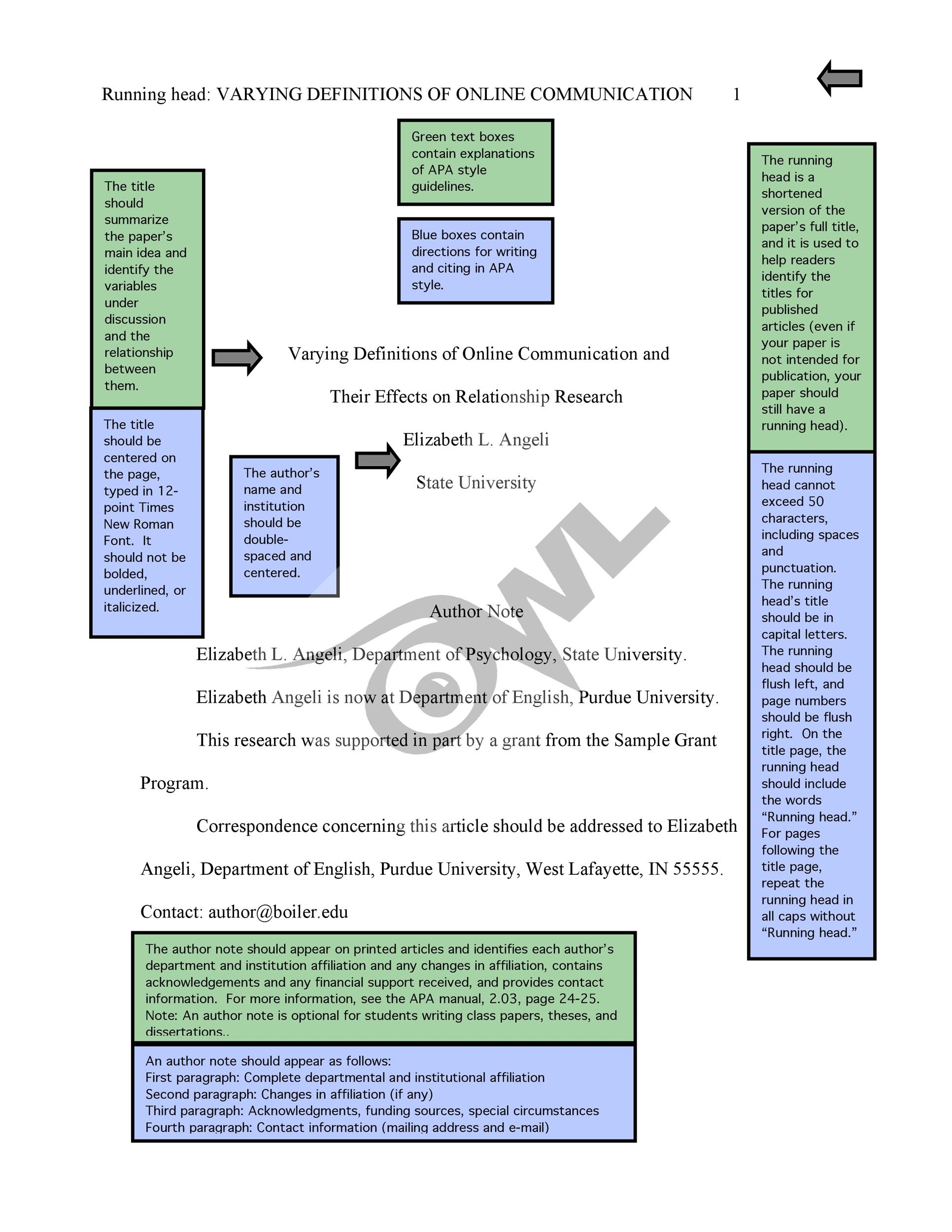 Most likely in college, you will be asked to write an APA paper. For those who have never written an APA paper there are some things you should know in advance. Before you begin writing, you should have a general idea of what your paper will be about and how it should be organized. If you need resources, select them before writing. This can be beneficial so that you know where to incorporate them into your essay. If you choose to use Microsoft Word, you can select the APA template, rather than a blank one. Your title page will have a running head in the top left corner on the paper. Centered on the page will be your name, title of paper, and university. Below that will be the author's note. Below author's note, you will write "this paper was prepared for..., name of course, taught by..." On to the next page, you will write your abstract. This is just a quick summary of what your paper is about. The third page is where you ultimately begin writing your body paragraphs. If you insert in-text citations, make sure to give the author credit by finishing your quote with (Author's Last Name, Year of Publication, page # if there is one given). Finally, you can get to the reference page. This is where you provide an alphabetical list of credit to the author's work that you have used.
When creating a presentation, the first thing we think of is PowerPoint, but now there are so many different websites that we can take advantage of to make a presentation. Haiku Deck is a newer app that can provide different things that PowerPoint can not. Haiku Deck is about making good-looking slides. With this app it is perfect if you are looking to make short, to the point slides. It is free, unless you would like to get new designs. Kingsoft Presentation Free 2013 is another app. This is very similar to PowerPoint and provides a variety of themes to chose from. You can also add sounds, background music, movies, and flash animations. Prezi is a common presentation website that is used now. Once you submit your information onto the slide, the finished product will jump around in a slide show. Softmaker is an Android based app. The app does come with a cost, but you can embed a variety of things with the exception of videos. Lastly, Pixxa Perspective is an iPad based app that you have to pay for. You create slides and fill them with data. This app does not allow you to embed links, videos, or sound. Once you know how to fill in the data it is an easy app to use.

What is Microsoft Sway? This is a website to create presentations. This can be used as an alternative for PowerPoint. Sway was created to convey concepts as clearly as possible. This is to provide information on screen, rather than to an audience. Sway automatically saves your work and you can embed your presentation to other websites. When using Sway online, you have the option to upload a Word, PowerPoint, or PDF document to create a Sway Presentation. With Sway, you have the opportunity to choose if you want your slides to run horizontally or vertically. Once you start really using Sway it becomes easier to use and is a very helpful way to make a creative presentation.
Using PowerPoint, it may become repetitive and boring. Now, Sway can help make your presentation a little more interesting. If you already have an Office 365 account, you are eligible to use Sway. When using this website, it is a little more helpful if you are creative. With creativity, it can take your slides to another level.
Comments
Post a Comment