Blog #3 Tips and Tricks Using OneNote
 Microsoft Office created one of the best note taking apps called OneNote. It allows the opportunity for students with learning disabilities such as dyslexia, to appreciate the app because of the features it has. These features consist of text that is recited back to you along with highlighting it. It can also divide words into syllables and can even highlight different verbs and syntax. This allows students to learn and truly understand English. A new font was released called Fluent Calibri to make it easier to read. You can find these beneficial tricks in the Learning Tools tab at the top of your OneNote screen.
 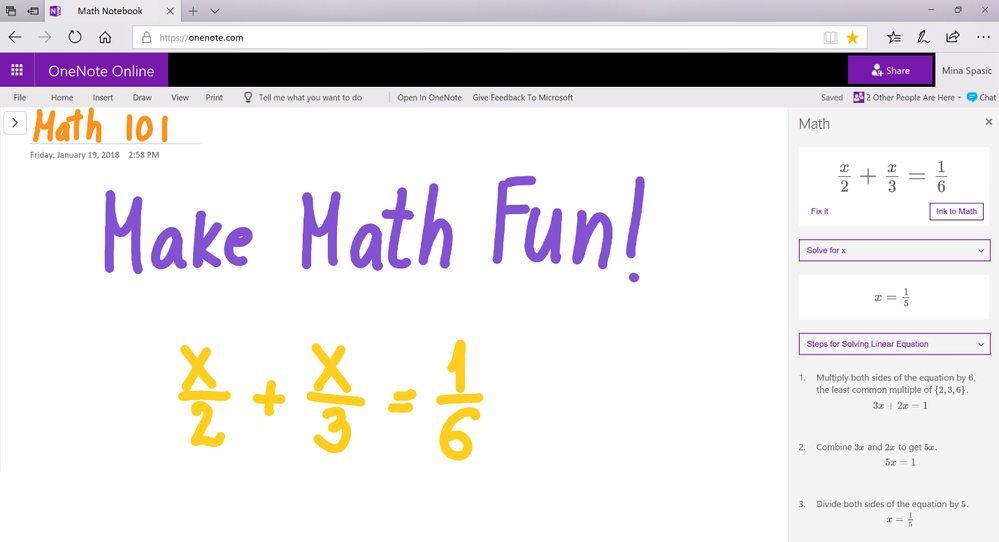 Another helpful tool that OneNote offers is the ability to do problem solving work. With the assistance of a stylus, you can hand write math problems and the app will teach you how to solve them. This math assistant automatically detects problems that were already in a OneNote page. Step-by-step directions are provided when the equation you are stuck on is circled. This is a valuable way to learn and can be extremely helpful when you are struggling in math.
  Have you ever been looking for the one specific email, but you can't seem to find it? Now you can forward your emails to OneNote and it will be saved for you. Simply just set up and email you want OneNote to save, choose the notebook you want your email to be stored to, and forward your email to "me@onenote.com" to be saved in your designated folder. Now it will be easier to find that specific email and keep track of any of the important files you were searching for.
There are many more perks of OneNote. As I learned in class, our Professor taught us even more tips on how to use OneNote to its max potential. We learned how to embed links, audio recordings, pictures, and YouTube links. To embed a link, you have to select insert and then link. A pop up will automatically appear asking you to add text to what your link is called and then a space for you to paste your link into. This keeps your links looking as professional as possible. Next, for audio clips, you select insert audio and you can record yourself right from your phone or computer. To embed a picture, you click insert picture and you have the opportunity to choose from a file, camera, or online. Lastly, a YouTube video. Go to YouTube and find any video of your choosing copy the link and paste it into the text space on your OneNote page.

Majority of the content we create nowadays are digital. For college students, we are always creating a PowerPoint, a Word document, or another form of online content. The book lol...OMG! teaches us how the the digital ways are superseding the physical. We have learned to stop using paper and a pencil so we adapted to the newest forms of technology. Us humans are constantly surrounded by computers and social media. The line between digital and physical content is diminishing because even if your work is handwritten, it is most likely being scanned onto the internet or on a mobile device. All of these social media websites ask the form of the question "What's on your mind?" They are constantly looking for our opinions so we keep their websites up and running. They are thriving off of the content we are providing for them. Websites with their own content want to know our opinions as well. Back in the day, there was no internet to find articles and websites. If you wanted to read, you would go and get yourself a newspaper or a magazine. These writings did not allow for feedback. The feedback you had was either stored in your head or you would have to go and share it with someone else. Google was created for one reason, to make content universally accessible. This allows for everything to be found with a simple search. When Google was created, so was cyberbullying. Content is stored online forever and anyone can find it.
Content that students create is divided into social and academic. The differences between the two are that for academic no one is making money off of a paper you are writing or the homework you are doing. Social content is always providing money to the specific network. With the quick press of a button the post you just made on Facebook or YouTube allowed the company to make money. We post careless content because we are so worried about who will see our stuff and what will they think, but we have to think ahead. We need to make sure that what we are posting now won't have a serious impact on us later on in life. Our online reputation is sometimes mislead to who we actually are. Google is great, but it is not always accurate. First impressions matter and sometimes that is effected by what you share with the internet. It is not just about what you post, it is also about what you say and how it is said. You might understand what you are trying to say, but others may not. When applying for a job, social background checks are done to find out as much as they can about you. Whether information about you found, good or bad, you should just be cautious to what is surfacing the internet about you.
Comments
Post a Comment